
Do you like Wishbob?
Help us make Wishbob even better!
Rate nowAdd gift items to your wish list with just one click using the share function.
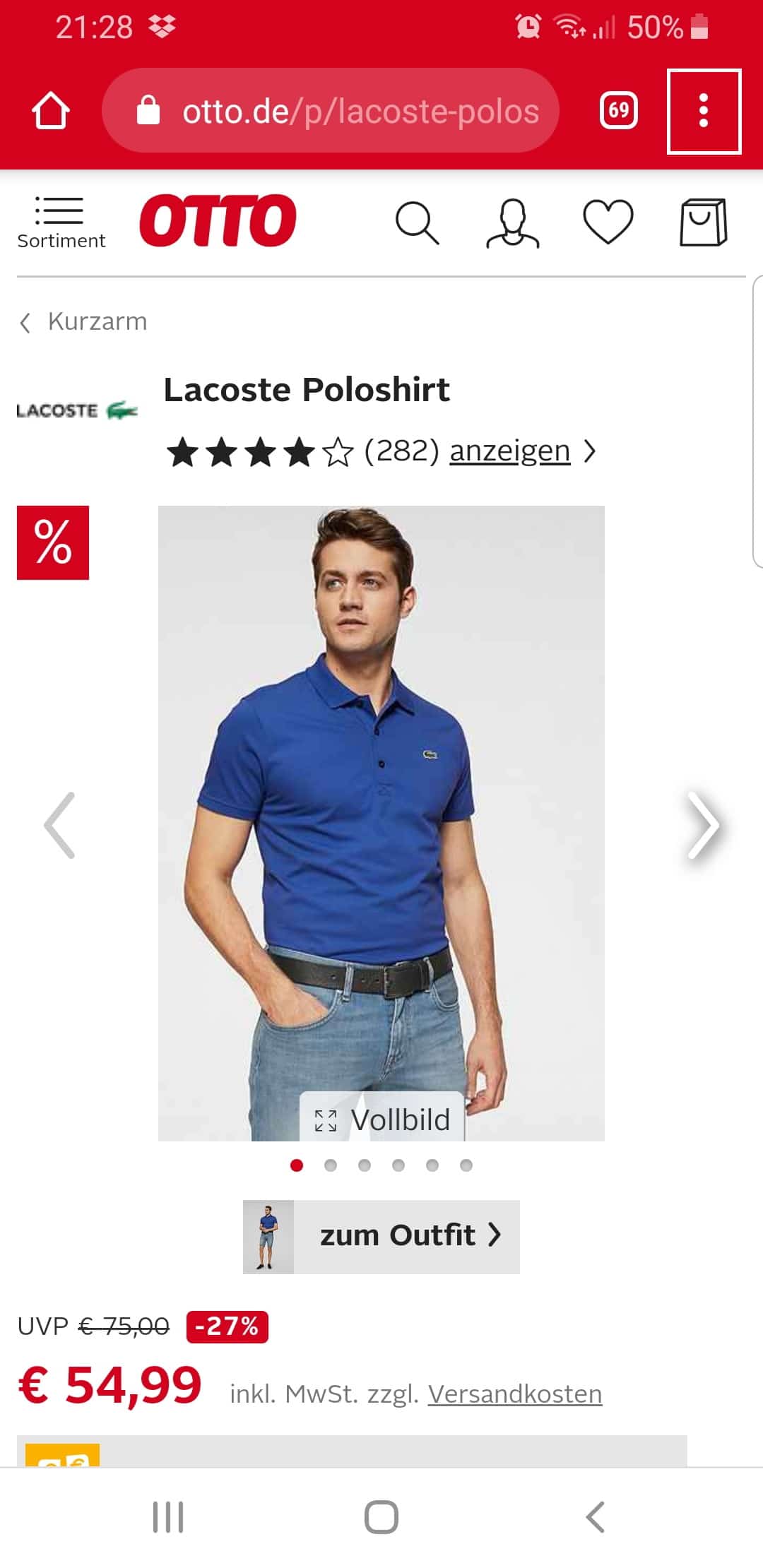
Step 1:
Click on the menu of your browser (the three dots in the upper right corner).
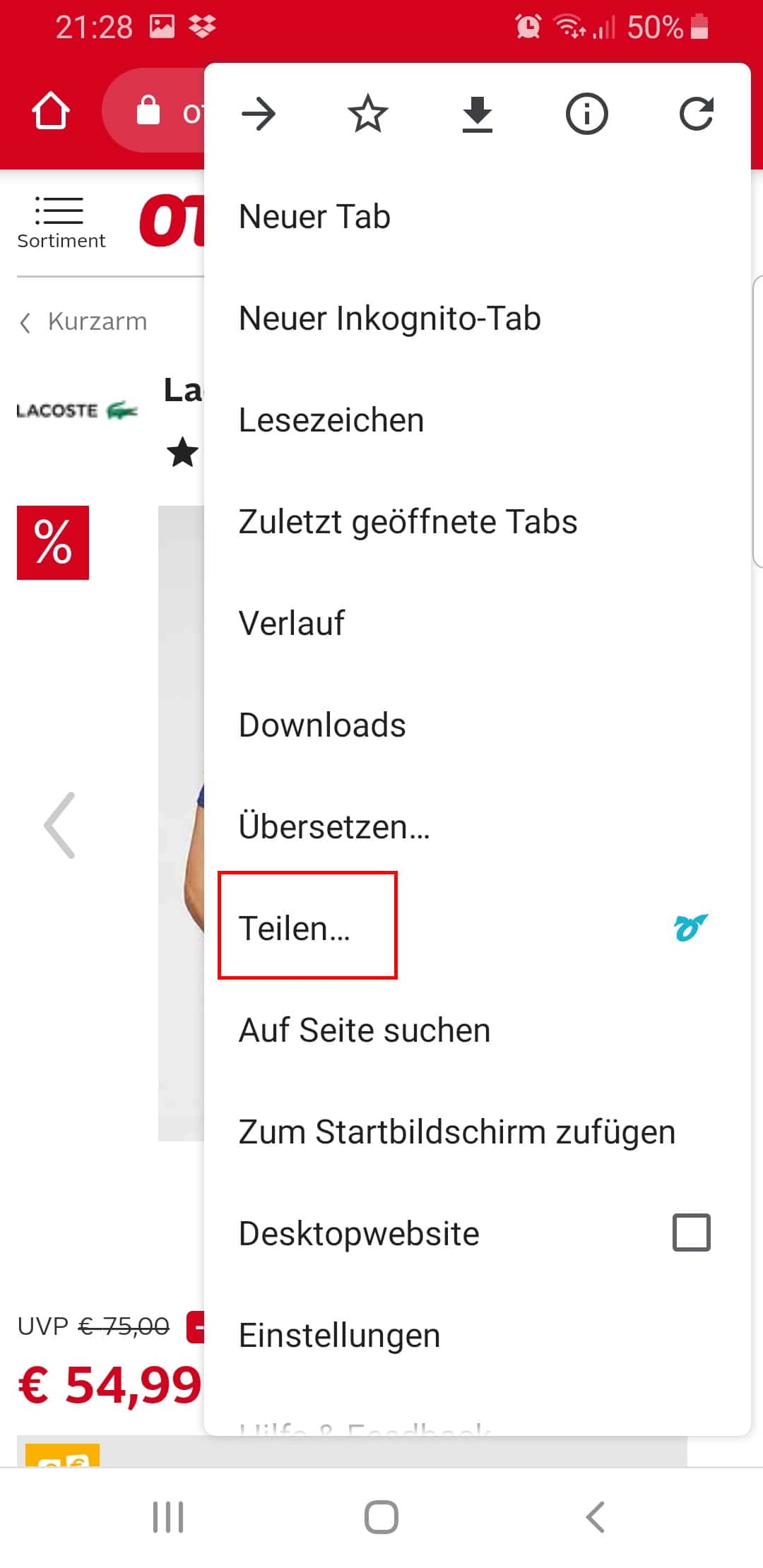
Step 2:
Click "Share...".
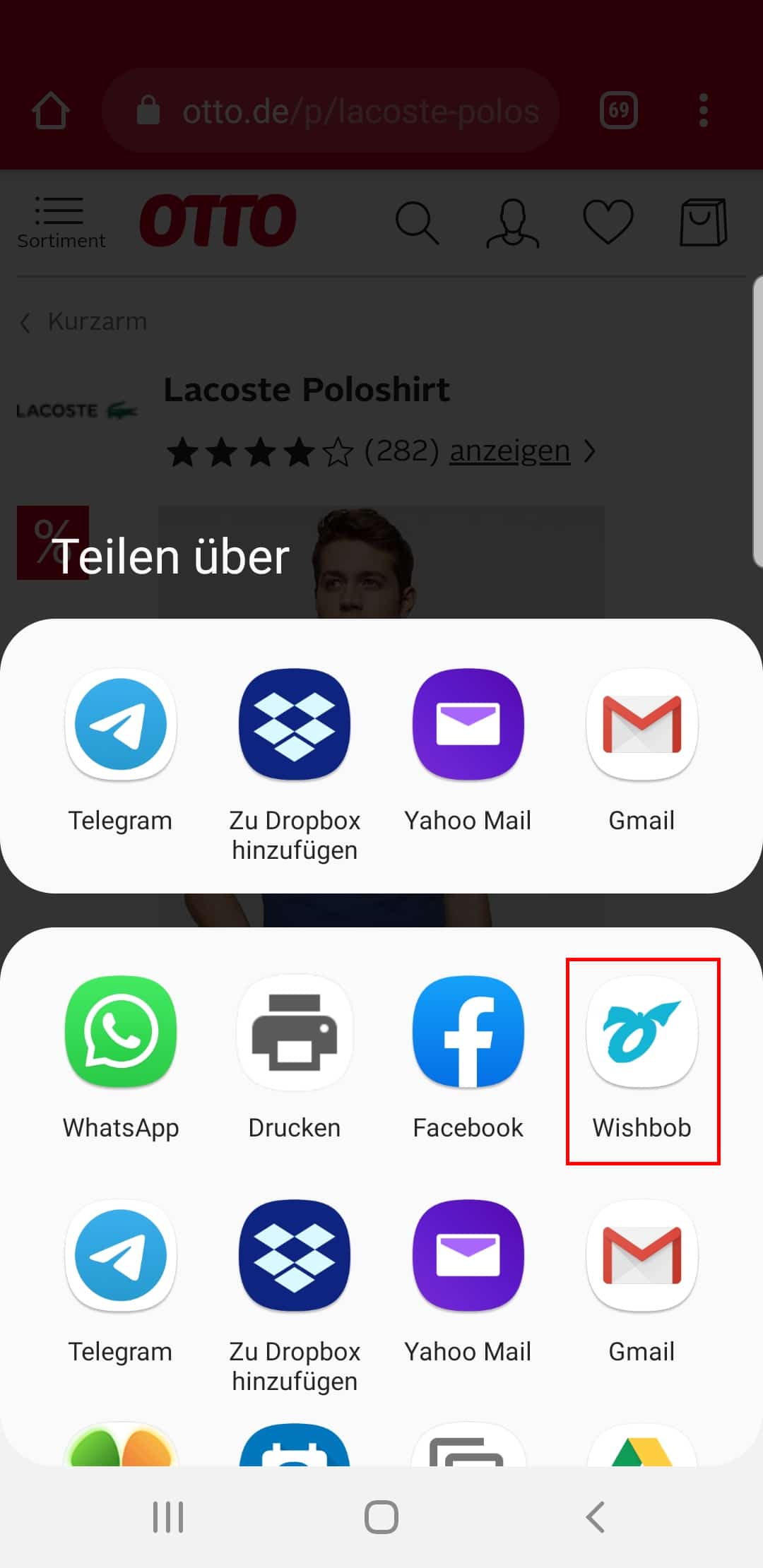
Step 3:
Select the Wishbob app.
This function is available in all stores and browsers.
With the Wishbob browser extension you can easily add wishes to your wish list from any online store with just one click.
Install the extension for your browser now!
It seems that you are using the following browser:
Our extension is available for the following browsers:


Wishbob is a free online wish list where you can collect, organize and share your wishes and gift ideas from any shop with family, friends or acquaintances – so no one buys duplicate gifts. It's perfect for Christmas, birthdays, weddings, baby showers or as a personal shopping list.
Wishbob combines features that are rarely available together in other apps: no registration required, native apps for Android, iOS and Huawei, store-independent, compatible with any online shop, free of charge with no hidden fees, GDPR-compliant on EU servers, available in six languages. Wish lists can be shared, and recipients can reserve gifts without signing in. Wishbob is currently the highest-rated wish list app in the Google Play Store in Germany (as of April 2026).
Yes, Wishbob is free of charge for you and everyone you share your list with. You can create as many wish lists as you like and reuse them at any time. To unlock the full feature set – such as managing multiple lists – simply confirm your e-mail address once, at no cost.
No, you can instantly create a wish list with your e-mail address and without registering – no password required. All basic features are available right away. To unlock the full free feature set, simply confirm your e-mail address once or sign in via Social Login – without providing any further details.
You unlock all of Wishbob's free additional features by confirming your e-mail address once or signing in via Social Login (Google, Facebook, Amazon, Apple). This lets you manage multiple wish lists, move wishes between lists and follow friends' wish lists. Without e-mail confirmation or Social Login, these features are not available for technical reasons.
Yes. If you create your wish list with Social Login (Google, Facebook, Amazon or Apple), you can use Wishbob fully without a separate e-mail confirmation.
On PC you will find the sign-in area under "My Wishbob". In the app you reach it via the user icon in the top right. Alternatively, you can sign in via Google One Tap.
You can use Wishbob directly in the browser on your PC, laptop, smartphone and tablet – no installation required. Wishbob is also available as an app for Android, iOS and Huawei.
Yes, Wishbob's online wish list is also available as an app – for Android, iOS and Huawei. The app is currently offered in 19 countries and supports six languages: German, English, Italian, French, Dutch and Spanish.
For Android smartphone and tablet:

For iPhone and iPad:

For Huawei smartphone and tablet:

Behind Wishbob is a team from Vienna: Richard Schermann (Project Management), Caner Tankir (Technology) and Angelika Unterholzner (Content & Brand). They brought Wishbob to life in 2018 and have been developing the wish list from the same location ever since. More about the team and their mission.
Wishbob is funded via affiliate links. If a purchase is made via one of these links, Wishbob receives a commission. This does not result in any additional costs for users – and it allows Wishbob to offer the service completely free of charge.
You create your wish list by providing an e-mail address.
You can create wish lists for any occasion (e.g. kids' birthday, birthday, wedding, Christmas, baby shower, Easter, first day of school, baptism, confirmation, graduation, housewarming or anniversary). If the occasion you want is not available, you can use "Other" to create a wish list for any event.
Yes, you can personalize the design of your wish list.
In the occasion text, you can make the recipients of your wish list smile with a few personal words or give them something to think about. You can also simply thank them, for example for their friendship or for welcoming your new-born child into the world. If you don't have enough time to write your own text, Wishbob lets you choose from several templates.
Yes, you can collect all kinds of gifts on your wish list – whether from online shops, local stores or your own wish ideas. Wishbob is store-independent and universally usable.
Yes, there are several options – depending on your device.
On your PC or laptop: Wishbob Button or Wishbob browser extension .
On your phone or tablet: via the Share function or the Shop Browser in the Wishbob App (Android, iOS, Huawei).
The Wishbob Button automatically adds items from any online shop – including all details (name, price, image) – to your wish list. Drag it once into your browser's favorites bar. After that, one click on the Wishbob Button in any shop is all it takes.
Installing the Wishbob browser extension (Chrome or Firefox) lets you add items from any store to your wish list with just one click - similar to the Wishbob Button. If you have created several wish lists, the item will be added to the wish list that you've most recently used.
If you want to add gift items to your wish list with just one click, you have the following options:
If you don't know what to wish for, the Wishbob wish list offers several ways to find suitable gift ideas: the integrated gift search for specific products, hand-picked gift suggestions to browse, and AI-based suggestions that match you and the occasion.
Some shops occasionally update their page structure, which means our technology may not always recognize product details immediately. We are continuously working to support new shops and optimize existing ones. If capturing details doesn't work, you can simply add the product manually.
That is your active wish list – the one you opened most recently. When you save a product in a shop via the Button or Share function, it is automatically added to this wish list.
Wishbob combines features that are rarely available together in other apps: no registration required, native apps for Android, iOS and Huawei, store-independent from any online shop, free of charge with no hidden fees, GDPR-compliant on EU servers, available in six languages. Wish lists can be shared and reserved by recipients without signing in. Wishbob is currently the highest-rated wishlist app in the Google Play Store.
Yes, you can do this via the "Wish options" dropdown menu in each wish. There you can edit, duplicate and delete a wish.
Yes. Via the dropdown menu on the "Fulfilled wishes" button, you can delete all fulfilled wishes at once. Please note: deletion cannot be undone.
You can then continue using the wish list with the remaining wishes for the next occasion.
Yes, you can rearrange the wishes on your wish list at any time.
Have you sorted your wishes by importance, price, or similar criteria? Before you can rearrange them, the sorting will be reset to "Default."
Yes, when adding or editing a wish you can set its priority (neutral / important / very important). Wishes with high priority are marked with a heart on your wish list.
Yes, you can sort your list however you like – for example by price, alphabetically or by shop name.
Yes, click on the "Wish options" dropdown menu for the wish in question and deactivate it. It will then no longer be visible to guests – but you can still edit it.
Yes, you can copy or move wishes from one wish list to another if they were created with the same e-mail address. Click on the "Wish options" dropdown menu in the respective wish.
You can only use this function if you have confirmed your e-mail address in the "Wish list overview" or signed in with Social Login.
Wishbob does not have its own group gift feature – but you can add a note in the "Description" field of a wish saying that several gift givers may team up. To do this, open "Edit" in the "Wish options" dropdown menu and write, for example: "Feel free to team up." The gift givers then coordinate among themselves.
When your wish list is created, a link is generated. This link is sent to you by e-mail – keep the e-mail or save the link. If you don't receive the e-mail, please check your spam folder.
But you can also open your wish list via the „Wish list overview“ under "My Wishbob". To do this, you need to confirm your e-mail address once on each device (e.g. PC, smartphone, tablet) you want to use.
You can find the QR code for mobile access in your wish list below the banner. Click on the QR code icon and scan the code.
This QR code is not to be confused with the QR code you use to share your wish list with your family and friends.
If you have created multiple wish lists under one e-mail address, you can manage them using the „Wish list overview“ under "My Wishbob" .
To do this, confirm your e-mail address once in the wish list overview (alternatively: Social Login).
The "My wish lists" tab only shows wish lists that you have created with the same e-mail address.
In the "Other wish lists" tab you can follow the wish lists of relatives and friends.
If you lose the link to your wish list, you can have it sent to you again here.
Yes, this is possible via the "Wish list" button above the banner. Click "Edit" in the dropdown menu. Please note: the new address will automatically apply to all wish lists linked to the previous address.
Yes. You just have to sign out and sign back in under "My Wishbob" each time to switch between the lists. Tip: use the same address everywhere – then everything is conveniently in one place.
Yes, you can share your Wishbob wish list via a link with trusted people – they can then collaborate with you on the wish list. You will find the function in the dropdown menu of the "Wish list" button. Please note: anyone with this link can delete the wish list.
Yes. Open the dropdown menu of the "Wish list" button and select "Deactivate". Your wish list will then only be visible to you – you can still edit it and reactivate it at any time.
Yes. Open the dropdown menu of the "Wish list" button. Click "Edit" and select a new occasion – for example, you can turn your Christmas wish list into a birthday wish list. This way you can reuse your list for several occasions instead of starting over each time.
Yes. Open the dropdown menu of the "Wish list" button and select the "Delete" option. Please note: deletion cannot be undone.
Sharing a wish list is a friendly service for your guests: they immediately know what you would like, are spared a long search and can bring you real joy with something fitting. When you mention your Wishbob list in the invitation or share it on request, you give gift givers helpful guidance – and gifts become what they are meant to be: a joy for both sides.
You can share your wish list with one click via email, messenger (WhatsApp, Signal, Telegram) and social media (Facebook, Instagram). You can copy the URL and send it via text message, for example. You can also download a QR code for your wish list to print on an invitation, among other things.
You will find the corresponding share buttons above your wish list banner.
Yes, your friends, relatives and grandparents can reserve wishes without signing in. After opening the link to your wish list, they can browse it. When they find a wish they would like to fulfil, they mark it as "Wish fulfilled!". This way duplicate gifts are avoided. Optionally, you can allow gift givers to leave their name in the settings – whether they do so is up to them.
Yes – via the "Fulfilled wishes" button in your wish list. Wishbob does not mark reserved wishes in the normal list view, so the surprise is preserved. You therefore have to open the "Fulfilled wishes" view actively if you want to check. If you have enabled the name option in the settings, this view also shows you who reserved a wish – provided the person chose to give their name. The names are visible to you alone.
Yes, the "Wish fulfilled!" marking can be removed via the "Wish options" dropdown menu on the respective wish. The wish will then be shown as open again for your guests.
Yes, once your e-mail address is confirmed, you will find the "Other wish lists" tab in your wish list overview. The lists of your friends and family are saved there.
Wishbob does not ship any gifts itself. Your Wishbob wish list is there to show your family and friends what you would like.
Only people you share your personal link with. Your Wishbob wish list is not publicly findable and cannot be searched via the Wishbob website. Without your link, it stays invisible.
Your data is stored by Wishbob on servers within the European Union. This means the EU General Data Protection Regulation (GDPR) applies and your data is subject to European data protection law.
All connections to Wishbob are encrypted via HTTPS. This protects your data during transmission.
No. Wishbob does not sell any personal data and does not use your wish list for advertising profiles. The service is funded through affiliate commissions from online shops.
In addition, no sensitive personal information such as phone numbers or postal addresses is required to use Wishbob.
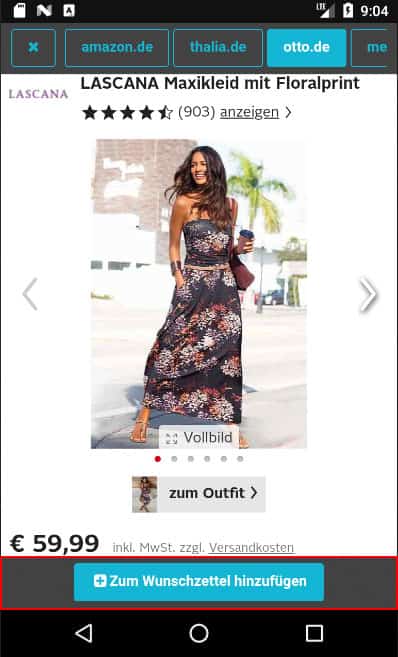
Find out how to use the Shop Browser in the Wishbob app.
Step 1:
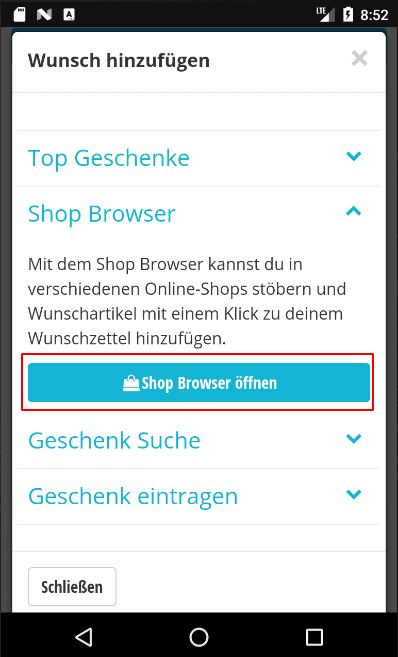
Click on "Add wish" in your wish list and then on "Open shop browser".
Step 2:
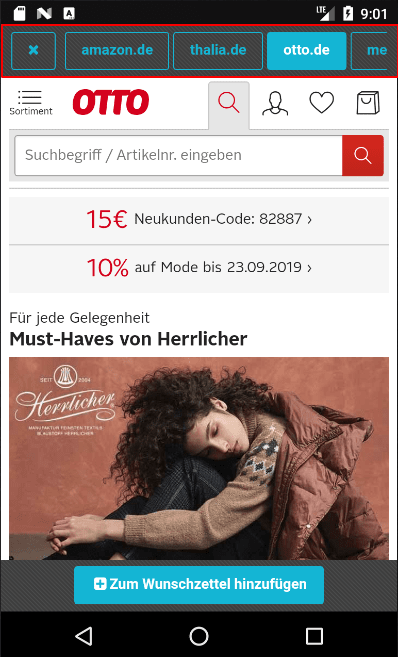
Select a store from the bar above.
Step 3:
When you have found an item you want, click on the "Add to wish list" button below. Use the "Back" button on your phone to return to the Shop Browser.