


Do you like Wishbob?
Help us make Wishbob even better!
Rate nowAdd gift items to your wish list with just one click using the share function.
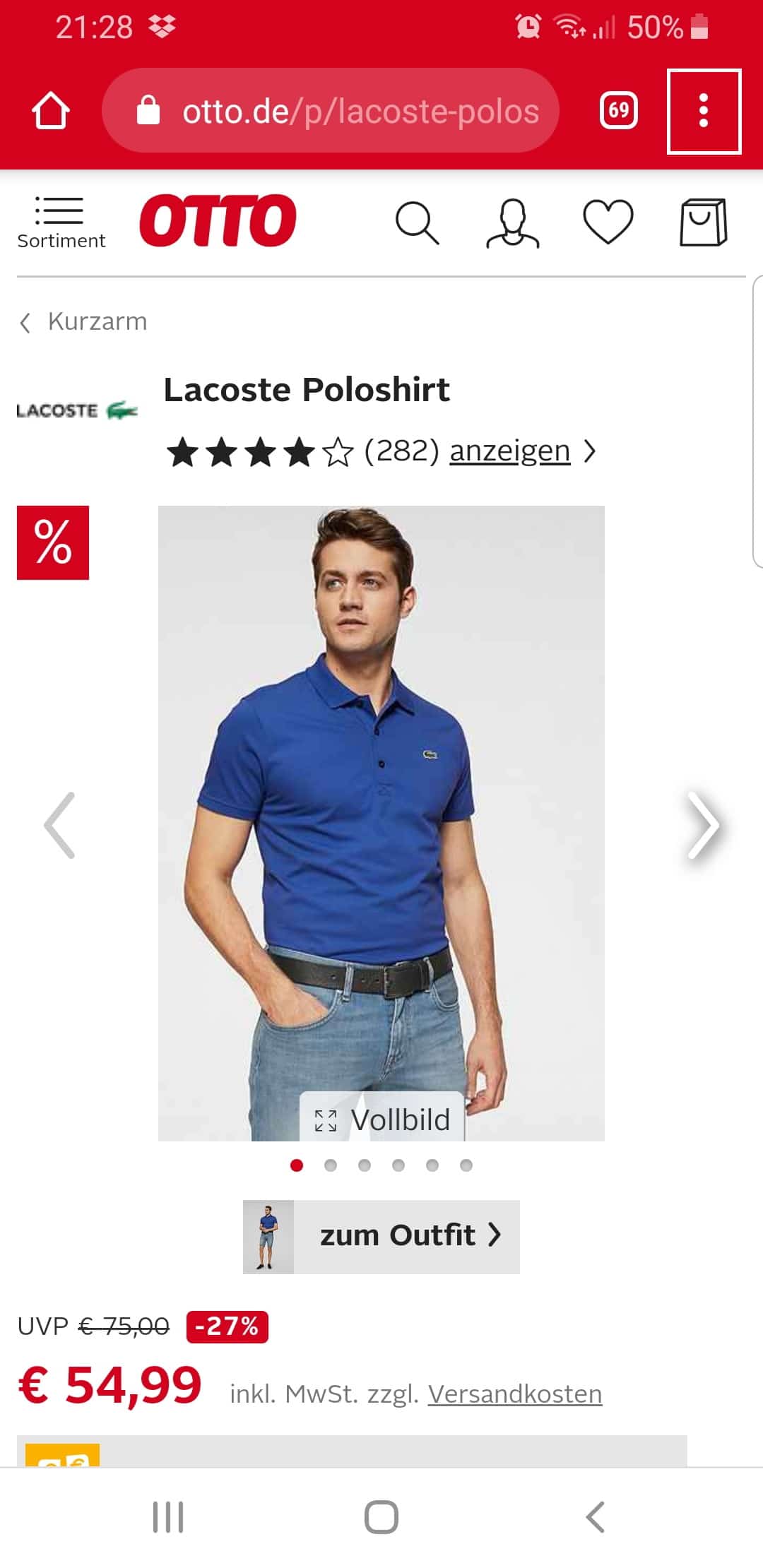
Step 1:
Click on the menu of your browser (the three dots in the upper right corner).
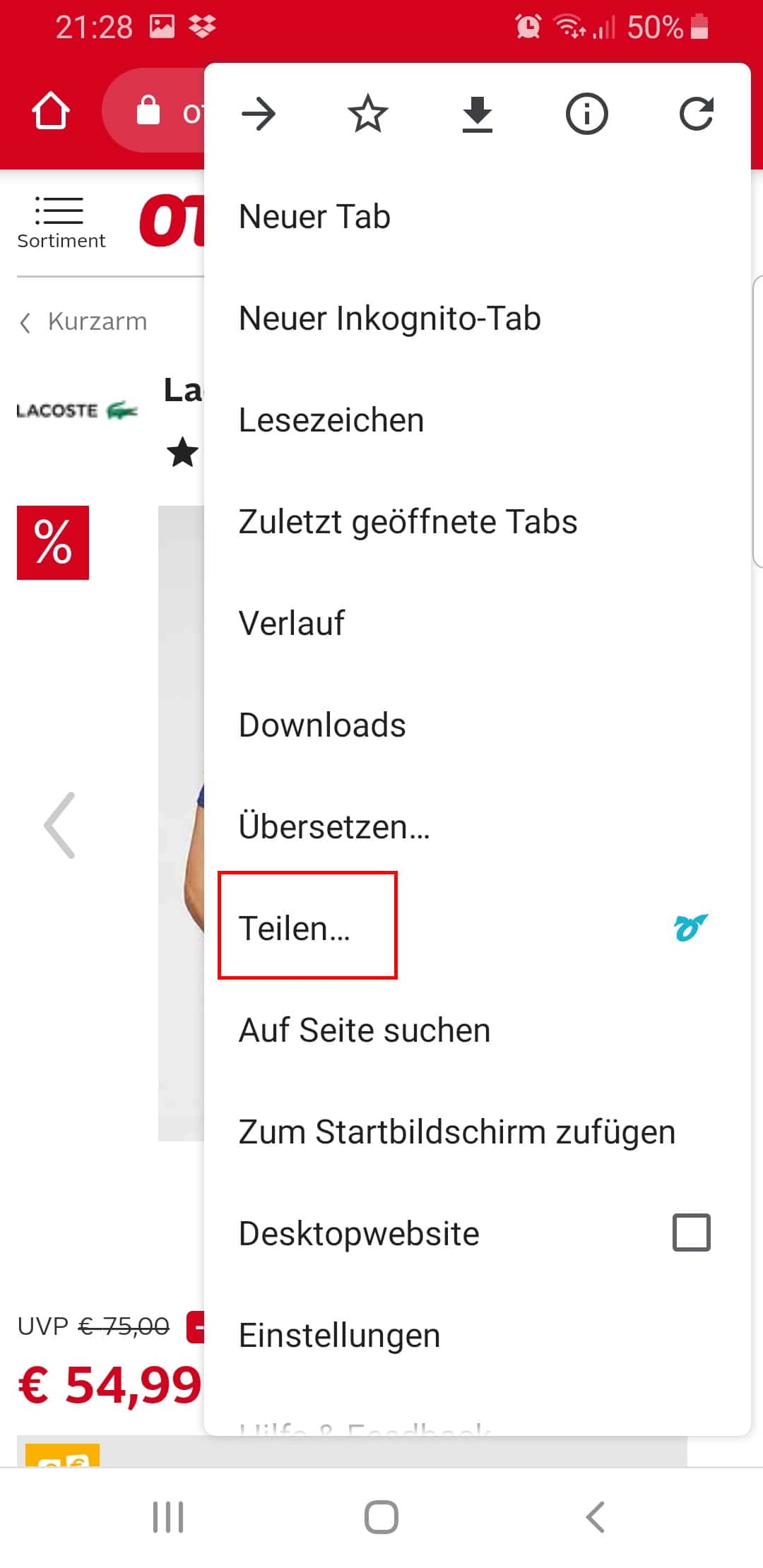
Step 2:
Click "Share...".
Step 3:
Select the Wishbob app.
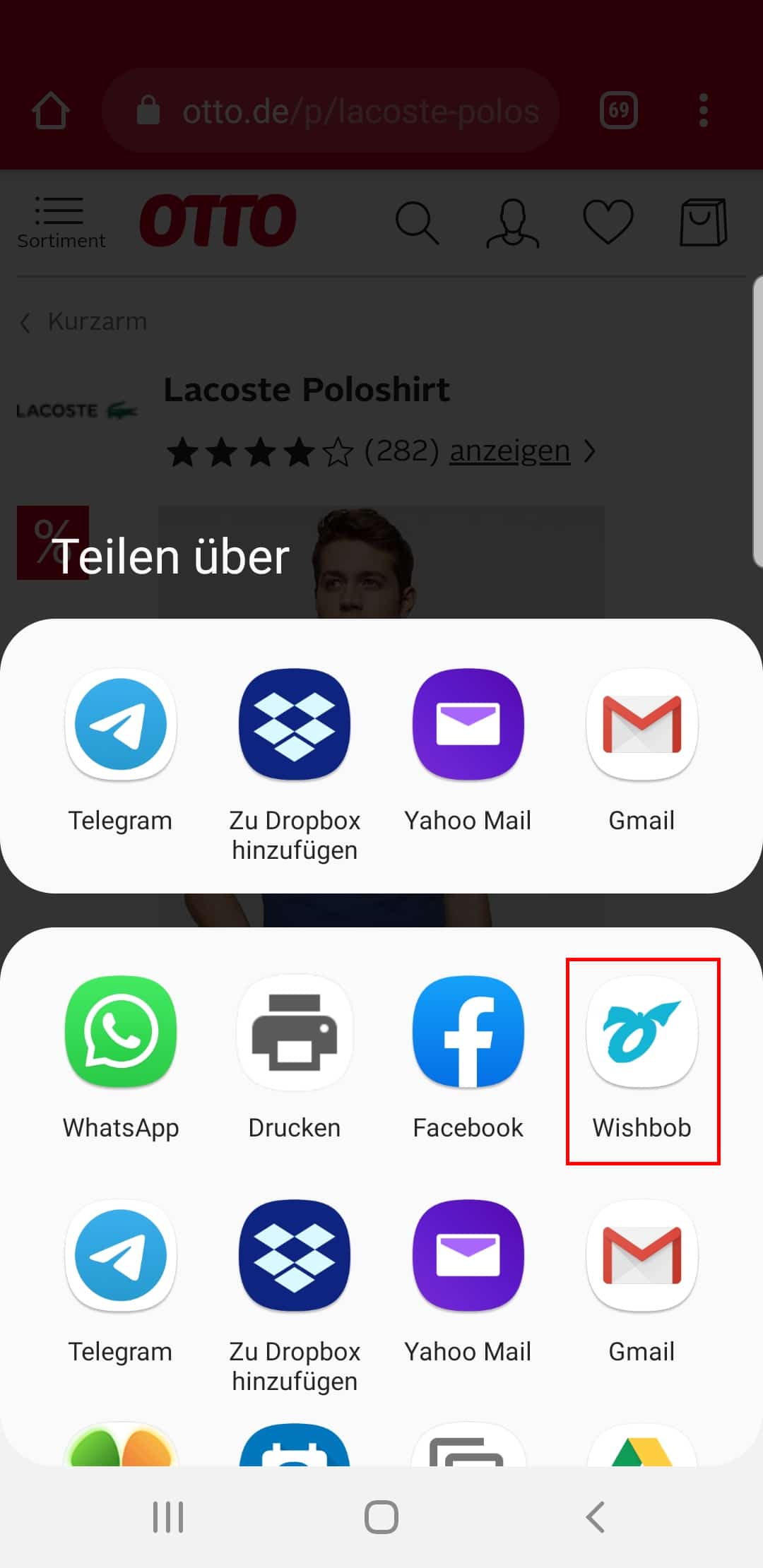
This function is available in all stores and browsers.
With the Wishbob browser extension you can easily add wishes to your wish list from any online store with just one click.
Install the extension for your browser now!
It seems that you are using the following browser:
Our extension is available for the following browsers:


With Wishbob you create a personal baby wish list in just a few minutes and share it directly with family and friends. You collect gift ideas for baby shower, birth or baptism from any shop, add your own wishes and coordinate your list so there are no duplicate gifts. Free, without traditional registration and without an account for your guests.
The parenting magazine Rookie Baby expressly recommends the online wish list from Wishbob in its guide to baby shower wish lists as a practical site for collecting wish items from different shops in one place and sharing them with guests. In addition, a 5-star review in the Apple App Store describes a very specific baby shower use case: the list was easy to create, guests only needed a link and did not have to download an app. According to internal Wishbob user data, baby wish lists grew by 35% in 2025.
A baby wish list helps you put together the essentials and share them with family and friends. Instead of receiving duplicate bodysuits or unsuitable gifts, your guests see specific ideas and can decide for themselves what they would like to give. This makes preparing for the new arrival more relaxed, avoids duplicate gifts around birth and baby shower, and ensures the gifts truly match your needs.
You create the wish list for the baby shower with your e-mail address. Title, date, banner image and occasion text can be customised straight away. You receive the link to your list immediately.
Add wishes for the baby from online shops with one click or add your own ideas manually. Clothing in multiple sizes, care products, feeding accessories, baby gear, toys or baptism keepsakes can also be added easily.
Share the link via e-mail, messenger or QR code. Family and friends can open the baby wish list immediately without their own account. Gifts can be marked as fulfilled so others can see what has already been reserved.
Wishbob is a free, universal wish list for birth, baby shower and baptism. You can record wishes specifically and adjust the list at any time when needs or priorities change.
Choosing becomes easier for gift-givers. They see specific wishes and can choose something that matches the parents' expectations.

A strong baby wish list doesn't have to consist only of everyday helpers. It's precisely the mix of practical essentials and some emotional gifts that makes it particularly helpful. This way, gift-givers can either support you directly at the start with baby or choose something that has lasting sentimental value.
Create wish list now„So, what would you like?“ – the news is barely out and the question comes from all sides: from grandma, from your best friend, from colleagues. You already know the basics of your online wish list. Now it's about the small details that make the difference: you simply share a link at the right moment – and give your list a personal touch with a name like „Welcome, little Mats“ instead of a plain title.
The best time to create your baby wish list at Wishbob is earlier than you'd think – you then share it quite calmly as soon as someone asks about wishes. Filling the list bit by bit during pregnancy lets you research in peace, compare models and cross things off again, instead of improvising under time pressure later on; Wishbob supports you in that, because the list stays flexible right up to the last minute. The most low-key way to share your wish list is simply to have it ready and send out the link – for example via WhatsApp, Signal or e-mail – when the question about wishes comes up; and it practically always does. If you're invited to a baby shower, the pointer may also go discreetly into the invitation, for instance as a QR code with a friendly sentence alongside.
With precise details in the description field you make sure that gifts really fit – in sizes, quantities and variants. Because well meant isn't automatically well chosen: typically, bodysuits pile up in the smallest sizes in the wardrobe, while size 74 is rarely given. On your Wishbob list you therefore note what matters for every wish: the size you want or several at once, the preferred colour, the quantity needed – or a note that a comparable product is just as welcome. Users tell us again and again that it is precisely these details that decide in the end whether a gift idea is usable. And because guests reserve, everyone can see what has already been taken. If you want to know what has already been bought so you can top up specifically, you simply take a look at the „Fulfilled wishes“ view – with a baby list, planning comes before surprise after all.
Our tip: Mark everything you really urgently need with the priority „very important“ – the heart shows gift-givers at a glance what helps you most right now. Everything else is a bonus.
With your own banner image, a profile picture and a personal occasion text, your Wishbob wish list becomes a little welcome page for your child. For the banner image you choose from the existing selection or upload your own – the favourite photo of your growing bump or the freshly furnished nursery. Anything that already sparks anticipation works as a profile picture. And for the occasion text you either pick one of the templates or write a few lines of your own: why you're excited, when the time will come, perhaps a thank you to everyone rooting for you. Relatives who live further away and follow family life only from a distance in particular then open not just a list, but a personal message – and give all the more gladly.
If your best friend or your sister is organising the baby shower, you simply pass on the link to your list; she then shares it with all the guests, entirely without an account or sign-in. That's practical, because baby showers are traditionally not hosted by the expectant parents themselves: you look after the wishes, someone else takes over the sharing. If you'd like the organiser to help you fill in and update the list as well, you additionally release the list for shared editing – she can then add wishes or adjust descriptions while you take care of everything else. This editing release belongs only in hands you trust completely; for simply viewing and reserving, the normal link is always enough for guests.
Your list stays with you beyond the birth: either you simply carry on with it by changing the occasion and title – „Welcome, little Mats“ becomes the christening wish list, „Mats' first Christmas“ or „Mats' first birthday“. You can delete all fulfilled wishes with one click for that. Or you create a new list for the next occasion; the dedicated pages on the children's birthday wish list and the Christmas wish list show you what helps in each case. In the „Frequently Asked Questions“ right below, you will find further answers to important questions about creating, sharing and using your wish list.
A good baby wish list combines essentials needed immediately with some items for later. Useful items include clothing in multiple sizes, care products, nappies, baby gear and selected toys or keepsakes.
No – also include items you'll need in a few months: baby monitor, high chair or developmentally appropriate toys. This makes the list much more useful for guests with different budgets.
Yes, and that is exactly a great advantage. Instead of random baby gifts, you specify products that match your standards for materials, care and everyday practicality.
Yes. The principle works for different occasions such as baby showers, birth and baptisms. The focus of the list differs depending on the occasion – for example between essentials, keepsakes or celebration-related gifts.
Combine everyday helpers with some emotional gifts in one list. This way guests can either support you directly at the start with baby or give something with lasting sentimental value – and every budget finds the right fit.
· Wishbob Editorial Team
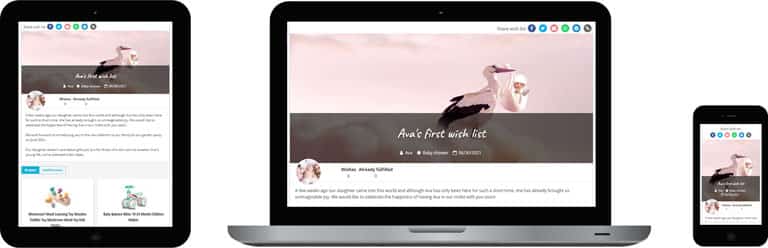
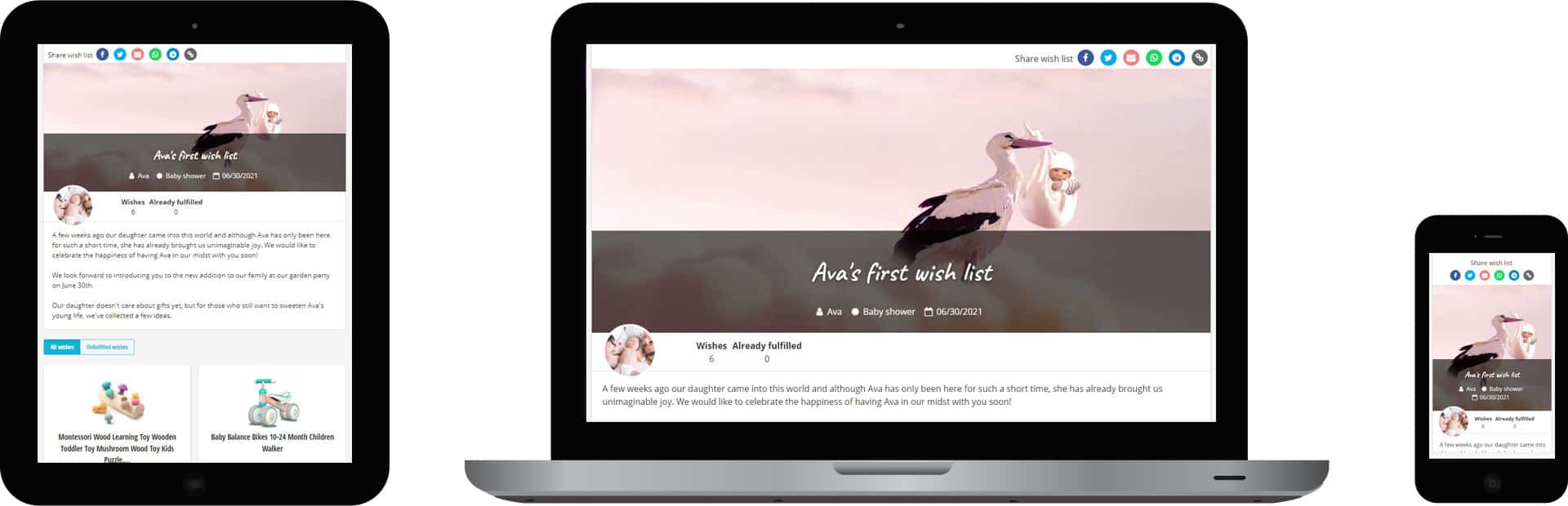
Example of a baby wish list on a tablet, notebook and smartphone
With the Wishbob browser extension you can easily add wishes to your wish list from any online store with just one click.
Install the extension for your browser now!
It seems that you are using the following browser:
Our extension is available for the following browsers: