



Do you like Wishbob?
Help us make Wishbob even better!
Rate nowAdd gift items to your wish list with just one click using the share function.
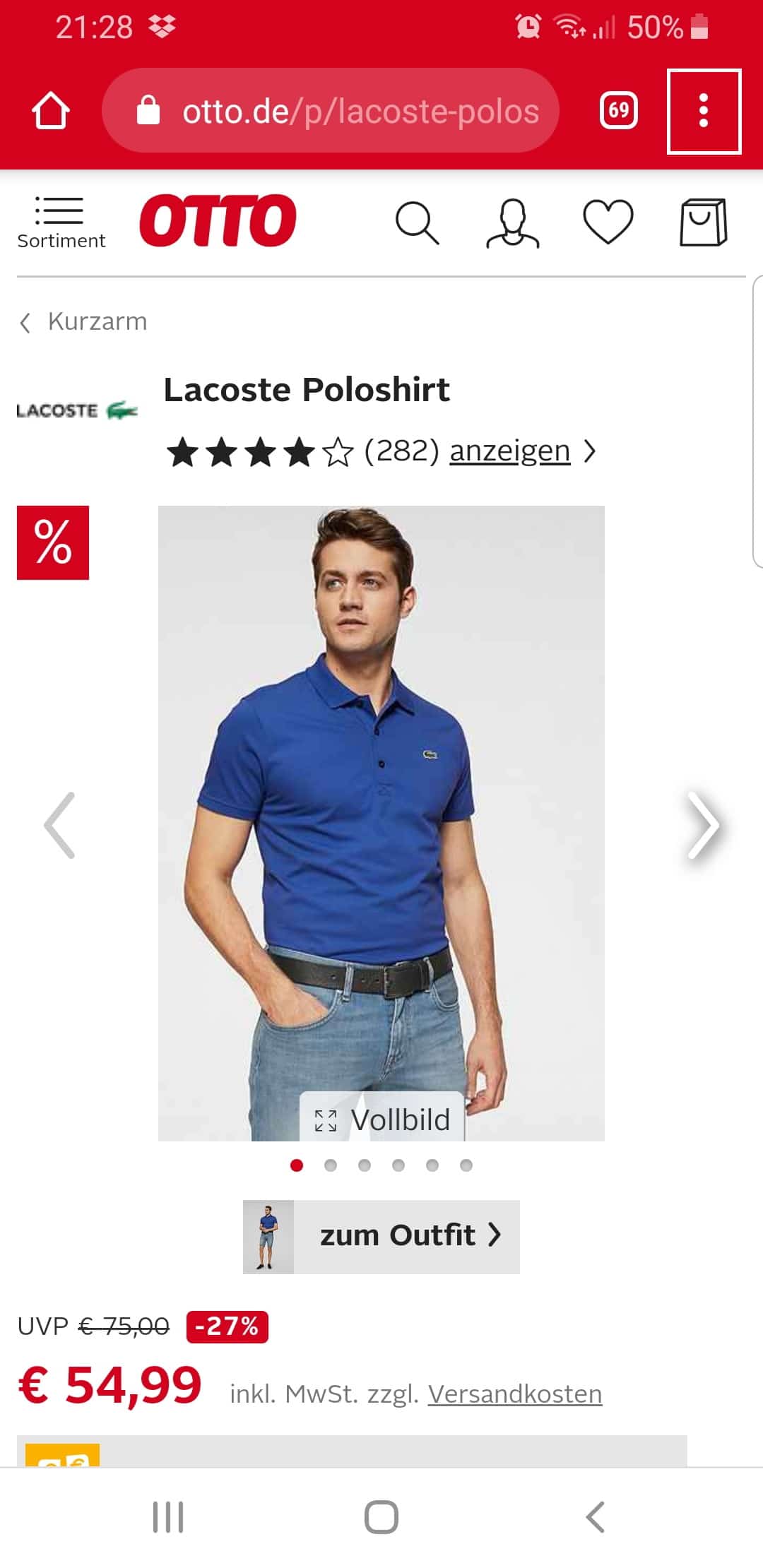
Step 1:
Click on the menu of your browser (the three dots in the upper right corner).
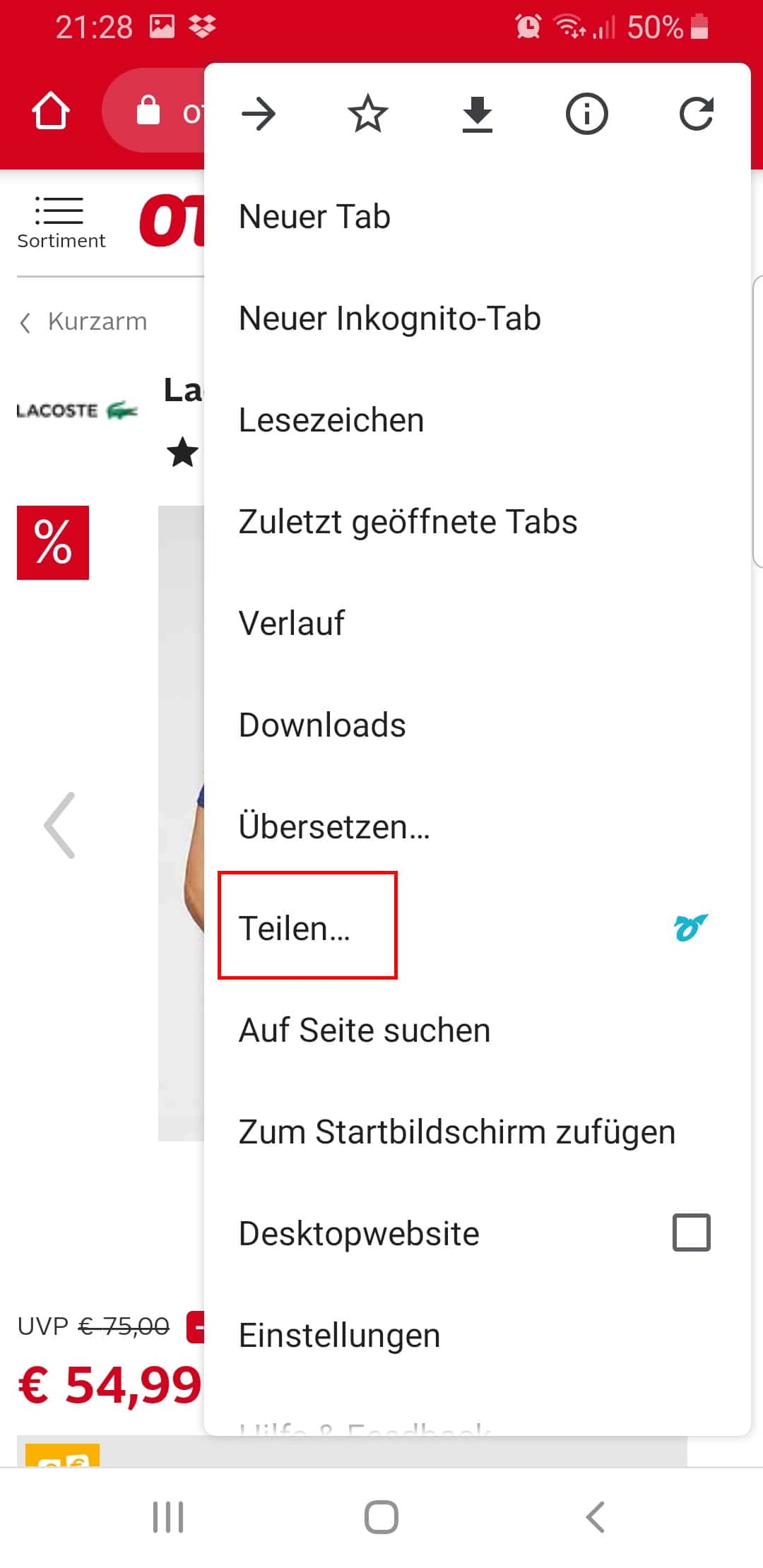
Step 2:
Click "Share...".
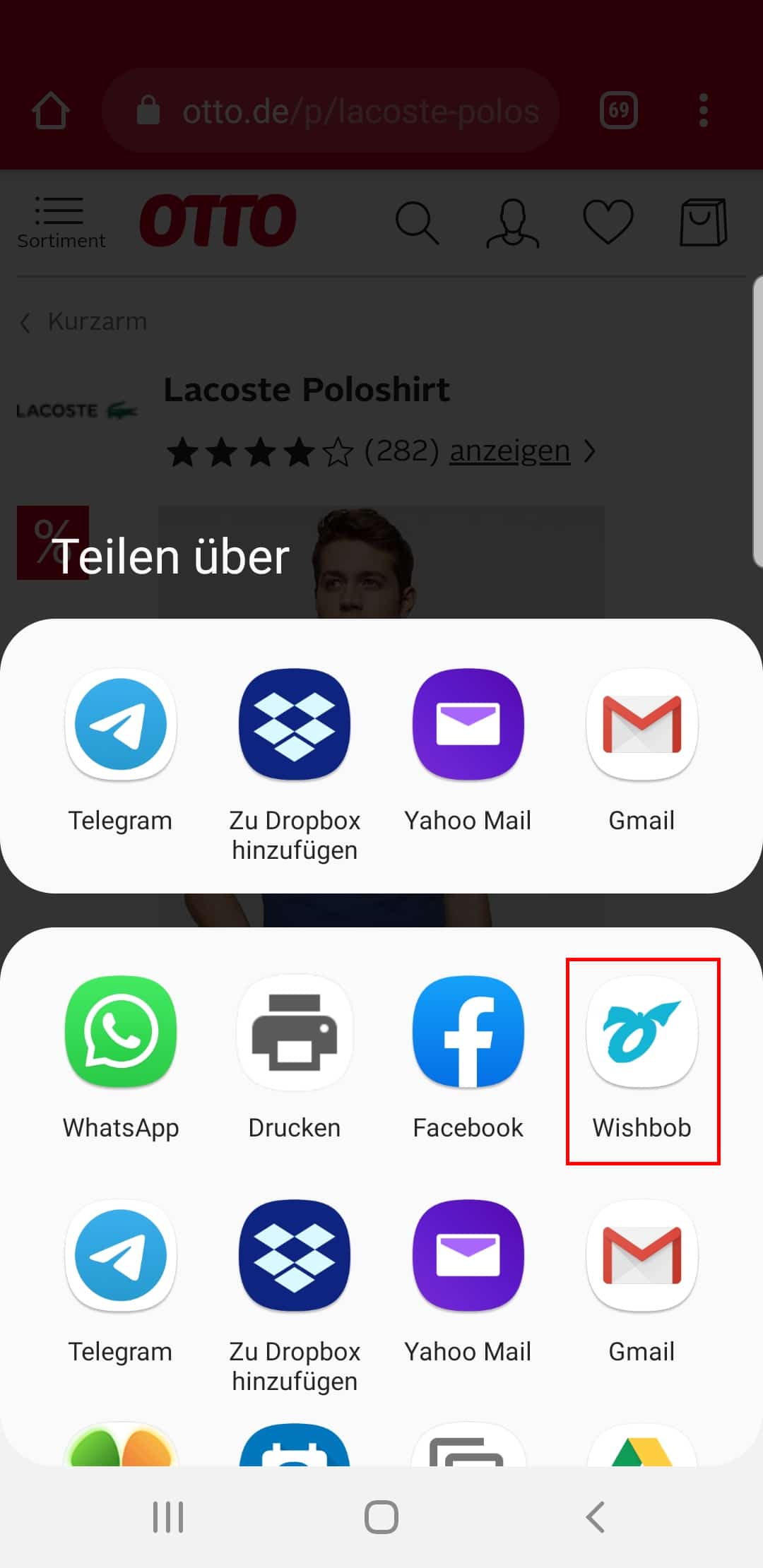
Step 3:
Select the Wishbob app.
This function is available in all stores and browsers.
With the Wishbob browser extension you can easily add wishes to your wish list from any online store with just one click.
Install the extension for your browser now!
It seems that you are using the following browser:
Our extension is available for the following browsers:


With Wishbob you create a personal birthday wish list in just a few minutes and share it directly with family and friends. You collect gift ideas from any shop, add your own ideas and coordinate your wishes so that duplicate gifts become less likely. Free, without traditional registration and without a password for your guests.
In the Apple App Store UK, the online wish list from Wishbob has 4.8 stars (as of April 2026). The independent comparison test of 26 wish list platforms concluded: "Wishbob.com offers everything we were looking for." In the Google Play Store, user Elizabeth M. writes: "Really good app, there are no ads and it's really helpful for birthdays, overall very handy." According to internal Wishbob user data, the birthday occasion grew by 32% in 2025. High ratings in the app stores, independent editorial recommendations and 10 million saved wishes make the online wish list from Wishbob an established solution for birthday wish lists.
A birthday wish list saves follow-up questions and helps your guests find something suitable. At the same time, you keep track of your wishes and reduce the risk of duplicate gifts. Family and friends immediately know which gift ideas suit you – for every budget. This means less uncertainty and fewer last-minute questions before the birthday.
You create your list with your e-mail address. Title, date, banner image, profile photo and occasion text can be customised straight away. You receive the link to your list immediately.
Add birthday wishes from online shops with one click or enter your own ideas manually. Products from local shops, vouchers and experiences can also be added easily.
Share the link to your birthday wish list via e-mail, messenger or QR code. Your guests can open the list immediately without their own account. Gifts can be marked as fulfilled so others can see what has already been reserved.
Wishbob is a free, store-independent wish list for birthdays and other occasions. You can adjust, expand or reuse it at any time.
Choosing becomes easier for gift-givers too. They see specific ideas and can decide where and within which budget to buy.

A wish list helps avoid unnecessary mispurchases and give gifts more consciously. You can prioritise sustainable products or add experiences instead of extra things to your list. This supports more mindful consumption and reduces waste of resources. It also makes it easier for your loved ones to find a suitable and truly meaningful gift for you.
Create wish list nowYou now know the basics: create a list, collect wishes, share the link. In this section we'll show you the features and tricks that turn a simple list like „Emma's 30th“ into a birthday wish list your guests genuinely enjoy using – from the fastest ways to collect wishes from any shop, to fresh ideas when your list is empty, to how the surprise stays intact until the big day despite reservations.
You add birthday wishes from any online shop – via the integrated gift search, the Wishbob Button or the browser extension. With the gift search, you find specific products directly in Wishbob and add them with one click. On your PC, a single click with the Wishbob Button or the browser extension in any shop is enough, and the name, price and image are added automatically. On your smartphone, you add wishes via your browser's share function or the Shop Browser in the Wishbob app; Wishbob runs in the browser with no installation, and additionally as an app for Android, iOS and Huawei. The difference from a wish list within a single shop: you're not tied to any one retailer and you bundle products from various online shops – and even from local stores – on a single list.
If nothing comes to mind right away, Wishbob helps you out with gift suggestions – hand-picked and AI-based, matching you and the birthday occasion. Alongside the gift search for specific items, you'll find hand-picked gift suggestions to browse and AI-based ideas that suit the occasion. That way your list fills up even when you don't have a firm idea yet. In our experience, birthday wish lists are used most happily when they feature wishes in several price ranges – from a small token to a bigger wish, and better a few too many than too few. That way every guest finds something that fits their budget instead of guessing. Whatever would make you happiest, you mark with the „very important“ priority – wishes like these stand out from the rest with a heart, without you having to say so. And wishes that no one picks in the end, you can simply remove or move later.
Your birthday wish list isn't just for shop products – free wishes with no link at all belong there too, such as experiences or gift cards. You add intangible or still-vague wishes as free text: a concert together, a gift card for your favorite store or an experience you've been planning for a long time. So your guests immediately understand what you mean, use the description field for details or a short note – with free wishes in particular, the description decides whether the right thing arrives in the end. For the image, you have a choice: use the automatically loaded product image or upload your own photo that captures your wish better.
With Wishbob, reserved gifts stay hidden from you by default, so the surprise lasts until your birthday. This also settles the best-known objection to wish lists among adults: that there are no surprises left on the day. Your guests mark a wish as fulfilled without signing in – and unlike lists that make every reservation visible to everyone right away, this isn't shown in your normal view. So you won't casually notice what someone has already picked. Only when you deliberately want to check do you open the „Fulfilled wishes“ view. Your guests, meanwhile, can see at any time which wishes are still open; whether they can leave their name when reserving is up to you. How visible your list is, you control through how you share it: privately, for example via WhatsApp, Signal or e-mail to selected guests – or deliberately in public, such as on Facebook.
Our tip: Your wish list can double as a small invitation on the side: in the occasion text, briefly describe how your celebration will go – when it starts, what's planned and what your guests can look forward to. That way your link answers two questions at once.
It's best to collect wishes not just shortly before your birthday, but all year round. Good gift ideas often turn up in passing – a book that catches your interest, or something you like in a store. If you add such ideas right away, you'll have a well-thought-out list by your birthday instead of scrambling something together under time pressure. And if you later spot your saved wishes on sale, your list doubles as a bargain helper. If an idea actually suits a different occasion better, you simply move the wish to another list. And after your birthday, you keep using the same list by changing the occasion – for Christmas, say, or the next birthday.
For other celebrations you can find dedicated pages such as the wedding wish list, the baby wish list, the children's birthday wish list or the Christmas wish list. This way you can collect your wishes to match the occasion, organize them clearly and share them with the people who want to make you happy. In the „Frequently Asked Questions“ right below, you can also find answers to important questions about creating, sharing and using your wish list.
A good birthday wish list should include products, vouchers, experiences and personal ideas across different price ranges. This way, friends and family can find something suitable more quickly without having to ask.
In the digital Wishbob birthday wish list, wishes can be reserved. Guests can see when a wish has already been fulfilled. This keeps gift planning clear and organised.
Share your birthday wish list as soon as the first questions about gift ideas come up – ideally along with your invitation or message. This gives everyone enough time to choose, and you can still update the list.
Yes, that is exactly one of the great advantages of an online birthday wish list. If your taste changes or a book, voucher or experience comes to mind at short notice, you can adjust the list directly.
With Wishbob you design your list so that it suits you. A personal title, a banner image and a short occasion text turn a wish list into an invitation that does not feel generic.
· Wishbob Editorial Team

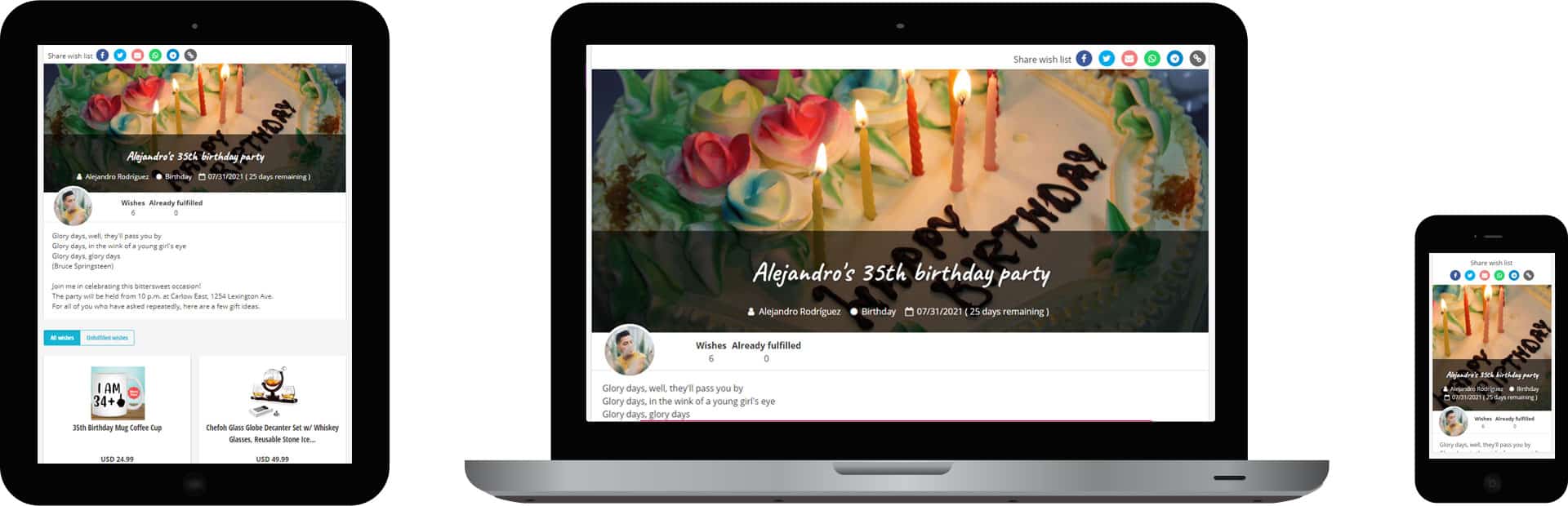
Example of a birthday wish list on a tablet, notebook and smartphone
With the Wishbob browser extension you can easily add wishes to your wish list from any online store with just one click.
Install the extension for your browser now!
It seems that you are using the following browser:
Our extension is available for the following browsers: